GetLostLeads captures form inputs in real-time as visitors type, enabling you to recover lost opportunities while strictly protecting user privacy and consent.
Founder-led public MVP · Unlimited usage for supporters · Direct roadmap influence
Why Users Trust GetLostLeads
Capturing partial inputs can feel sensitive. We built the industry's most robust privacy protections so your visitors are structurally safe.
Sensitive Fields Excluded
Our SDK dynamically filters passwords, credit cards, CVVs, PINs, and hidden fields using multi-language regex scans before sending any data.
Consent-Aware Capture
Support flexible user choices. Capture full inputs only when consent is given, or fallback to anonymous metadata events (lengths, focus, blur counts) if declined.
Instant Purging & DSR
Fully respect user rights. Visitors can initiate Data Subject Requests (DSR) to delete their captured logs instantly from our databases.
Founder Built & Public
No selling data to third parties, no complex tracking networks. Just a direct founder-built tool focused on restoring lost sales opportunities.
How GetLostLeads Recovers Opportunities
A seamless, privacy-preserving pipeline running in the background.
Visitor Starts Typing
The visitor interacts with your website form. The lightweight SDK attaches listener focus/blur/input events.
Safe Fields Synced
Allowed fields (like email or name) are securely matched. Sensitive inputs are structurally blocked and never leave the browser.
Dashboard Updates Live
Submissions and partial drop-offs populate on your dashboard, complete with drop-off statistics.
Workflows & Notifications Run
If configured, native workflows dispatch emails, log to sheets, notify Slack channels, or route WhatsApp alerts to your team.
What We Structurally DON'T Do
We don't collect passwords or credit card details
Our analyzer blocks password fields, credit card text patterns, CVV codes, and background pin numbers automatically.
We don't track hidden inputs or record keystrokes
Only visible, non-sensitive standard inputs are tracked. We do not keylog typing speed or clipboard values.
We don't sell data to advertisers or third parties
All captured data belongs entirely to you. We do not monetize lead lists, share cookies, or build user profiles.
We don't replace your CRM or core database
GetLostLeads acts as an intelligent recovery layer, syncing captured entries to sheets or CRMs rather than holding data hostage.
Who is GetLostLeads For?
SaaS Founders
Recover lost signups from pricing pages, waitlists, and onboarding screens.
Marketing Agencies
Prove higher ROI by capturing lead leaks and optimizing client contact forms.
Waitlists & Launches
Capture interested emails even if visitors quit the waitlist form before submitting.
Lead Gen Marketers
Maximize conversions from paid ad campaigns and route high-intent leads instantly.
Consultants
Track request details to follow up with potential clients who got cold feet mid-form.
- Direct Founder Access: Have an idea or need a feature? Chat with us directly. We build fast.
- Rapid Releases: Updates, improvements, and new nodes are deployed weekly.
- Unlimited MVP Usage: Early supporters get completely unlimited form recovery during the MVP phase.
Early Adopters Shape GetLostLeads
"We are looking for our first 50 SaaS teams to build in public with us. Want your logo and success story featured here? Join the waitlist and grab the Early Supporter tier today."
— Build In Public InitiativeCapture leads before they even submit
Most forms only tell you about people who clicked 'submit'. GetLostLeads captures data as it's typed, so you never lose a lead to a closed tab.
Integrations are for connectors. Workflows are for results.
GetLostLeads doesn't just 'connect' to your tools. Our native workflow builder lets you map out your entire lead journey in one place. Zero code, zero technical breakage.
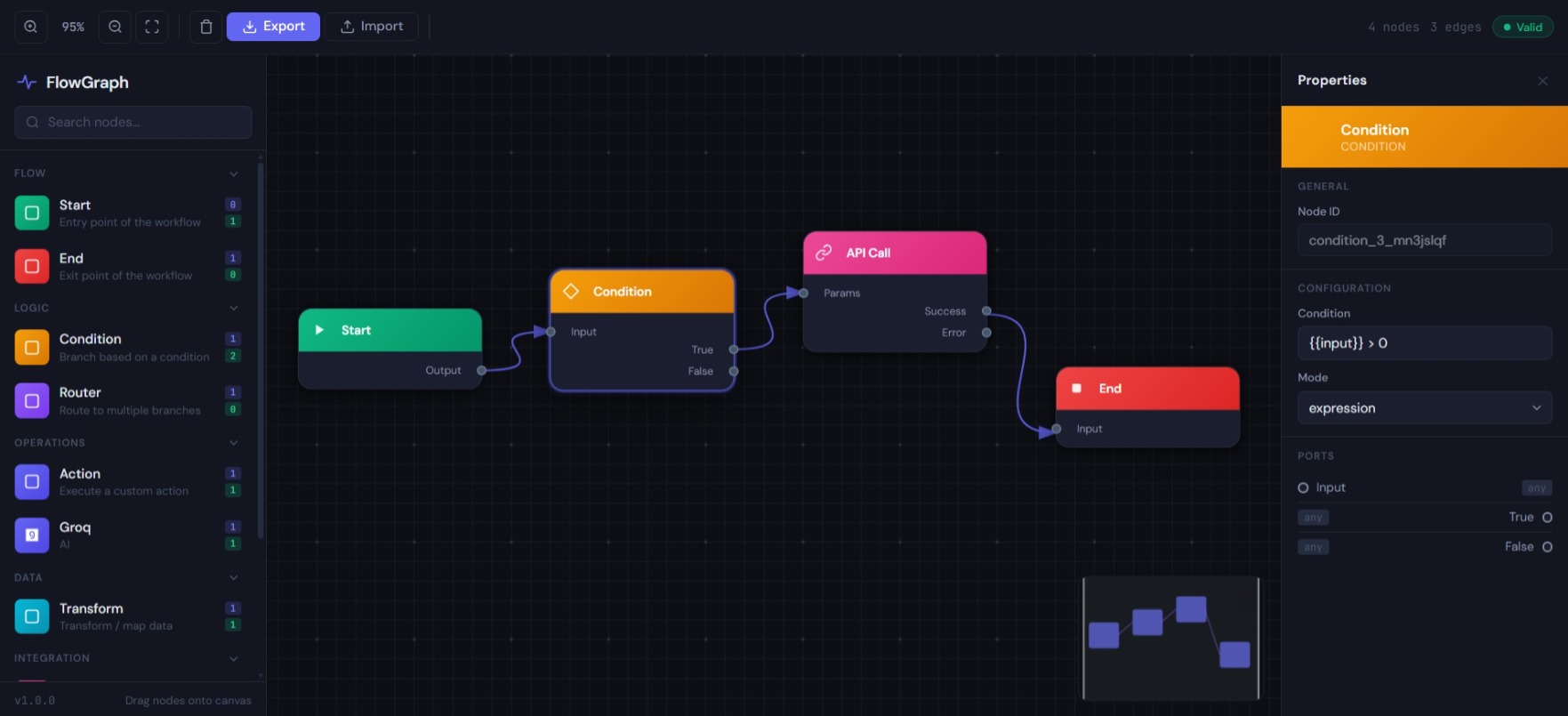
Built for how you actually grow
From SaaS waitlists to high-volume agency forms, GetLostLeads handles the ingestion and automation so you can focus on the leads.
Meera · TechCorp
Budget: $800/mo
⚡ High value
High-value lead routed
Stop paying for 'duct-tape' integrations
Zapier and Make are great, but when they sit between your form and your data, things break. GetLostLeads moves the automation inside the form.
You’re already paying for all of this — just separately
Most teams run 4–5 tools that weren’t built to work together, pay for each one monthly, and spend hours debugging broken Zapier zaps. And none of them tell you about leads who abandoned your form halfway through.
What actually changes when you switch
You find out about leads when you check email
Hours pass. They’ve already signed up with whoever replied first. Speed to response is the single biggest conversion lever in SaaS.
You know the moment someone is interested
The notification hits your phone before they’ve closed the tab. You’re first to respond, every time — even at 2am.
You have no idea how many leads you’re losing
People start your form and disappear. You see 31 submissions. You don’t see the 53 who started and left. You’re optimising blind.
You see every lead — even the ones who left
Partial submission tracking shows who started, what they filled, and exactly which field made them leave. Fix your form with real data.
Zapier breaks silently — you notice two weeks later
You changed a field name. The zap stopped. Nobody noticed. Leads collected and went nowhere for 14 days.
Automations live inside your form — nothing breaks
No third-party glue. Edit any field, the workflow still works. Change your form completely — everything reconnects automatically.
Up and running in under 5 minutes
No developer needed. Works on any website, CMS, or framework.
Pay for the platform.
Only pay for automations when they run.
No hidden costs. If you never build a workflow, your bill is just the subscription — nothing else.
Why our pricing actually works
Zapier charges a flat monthly fee for 'tasks' that never run. GetLostLeads charges a subscription for the platform, and credits only for the runs that happen.
| What you need | GetLostLeads ₹500 | Typeform $25 | Jotform $34 | Formspree $20 | Forms + Zapier |
|---|---|---|---|---|---|
| Instant team notification | ✓ built-in | Needs Zapier | Needs Zapier | Needs Zapier | Extra $9+/mo |
| AI reply to every lead | ✓ built-in | ✗ | ✗ | ✗ | Extra tool |
| See abandoned leads | ✓ built-in | ✗ | ✗ | ✗ | ✗ |
| Follow up on abandonment | ✓ built-in | ✗ | ✗ | ✗ | ✗ |
| Google Sheets sync | ✓ built-in | Needs Zapier | Limited | Needs Zapier | ✓ |
| Instant email to lead | ✓ built-in | Basic | Basic | Needs Zapier | Extra cost |
| Drag-and-drop builder | ✓ | ✓ | ✓ | ✗ | Separate |
| Works on existing website | ✓ one line | Embed only | Embed only | ✓ | ✓ |
| Automations pay-per-run | ✓ only model | N/A | N/A | N/A | Monthly flat |
| AI spam filter | ✓ free | Basic | ✓ | reCAPTCHA | reCAPTCHA |
| Sub-accounts for clients | ✓ Pro plan | ✗ | Extra cost | ✗ | ✗ |
| Total monthly cost | $19–27/mo | $34–100/mo | $43–120/mo | $29–80/mo | $34–80/mo |
Calculate your costs with AI
Describe your leads, your tools, and your goals. Our AI will tell you exactly which nodes you need and what you'll spend.
Your next lead deserves an instant response — not an email you check tomorrow
Join SaaS founders and marketing teams who replaced their duct-taped form stacks with one platform that actually works together.
GetLostLeads helps businesses recover lost opportunities while respecting user privacy and consent requirements.
© 2026 GetLostLeads. All rights reserved. Built by founders, for founders.